Deadline Extended: The U.S. Department of Justice extended NC State’s digital accessibility compliance deadline to April 26, 2027.
As we get closer to the April deadline for ADA Title II digital accessibility compliance, it’s easy to feel overwhelmed. While there’s a lot of work ahead, understanding what content to prioritize can help.
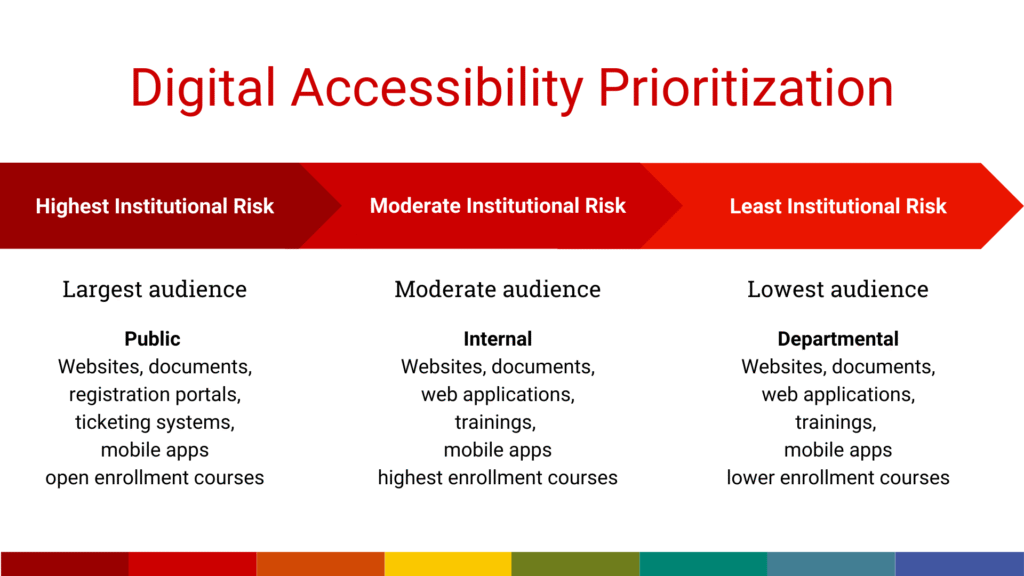
Evaluate your content based on availability and audience size. Here are the top two priorities to consider.

Pathway to Compliance
Learn It, Audit It, Improve It is a campuswide initiative to empower everyone at NC State to help create an accessible digital landscape and meet new federal accessibility standards.
Learn about the initiativePriority 1: Content Available to the General Public
The highest priority is content accessible to the general public. This is because we don’t know whether the user has a disability that affects how they engage with and consume digital content. An estimated 20% of the population has a disability that may affect how they operate in digital environments.
NC State’s digital content includes any websites, documents, forms, registration or reservation portals, and mobile apps associated with university services, programs and activities. This also includes third-party digital content and platforms that provide services directly associated with NC State.
If you use a third-party vendor to design and host your digital content, you will need to assess and work with the vendor to remediate all content to meet WCAG 2.1 AA guidelines. If you use Google Sites, consider migrating that content to a free NC State-themed WordPress site.
Use analytics to further prioritize your work, focusing first on the most frequently accessed content.
In January, NC State will launch a Web Accessibility Challenge through the Digital Accessibility Workgroup, which includes all colleges and divisions. This will help ensure that our publicly available content is accessible and push us toward ADA compliance. Be on the lookout for more details.
Priority 2: Internal Content That Requires Login
Internal digital content that requires login has a smaller audience than the general public and, therefore, poses less risk of non-compliance. Content with the largest internal audience, such as web-based trainings, financial systems and knowledge bases, should be prioritized over content with smaller audiences, like internal department documents and web content.
Prioritize academic course content in the same way. Courses with the highest enrollment will have the highest likelihood that someone will need access. You should also consider when those courses are offered. Focus on courses offered in Summer 2026 and Fall 2026 before those offered in Spring 2027 and later.
Resources
As we move toward compliance, remember our top priority is ensuring an accessible public presence. To reach that goal, it’s everyone’s responsibility to learn the basics and make improvements. These resources are available to support you:
- For help determining priorities, contact the Digital Accessibility Lead for your college or division.
- For NC State WordPress questions, attend WordPress Office Hours.
- For general accessibility help, join First Fridays: OIT Training Team Office Hours.
- Categories: